
How to Automate Field Service SLA Monitoring and Escalations
A missed SLA rarely announces itself. A technician gets delayed, a ticket sits unassigned for an extra hour, and by the time anyone notices, the customer has already called to complain. This is the exact problem SLA monitoring software is built to solve — it tracks every service commitment in real time and flags problems before they become breaches.
If your field service team is still tracking SLAs through spreadsheets, email reminders, or a dispatcher’s memory, breaches are not a matter of if but when. This article walks through what SLA monitoring actually involves, why manual tracking breaks down at scale, and how to set up automated monitoring and escalations that protect both your customer relationships and your service contracts.
By the end, you’ll know what to look for in SLA monitoring software, how to structure escalation workflows, and the best practices field service teams use to keep compliance rates high without adding administrative overhead.
What Is SLA Monitoring in Field Service?
SLA monitoring continuously tracks service commitments — such as response time, resolution time, and visit frequency — against the actual performance of field teams, and it triggers alerts when a commitment is at risk or a team has missed it.
In field service, SLAs typically cover things like:
- Time to acknowledge a service request
- Time to dispatch a technician
- Time to arrive on-site
- Time to resolve the issue
- Frequency of scheduled maintenance visits
Each of these is a countdown clock. SLA monitoring software watches those clocks across every open ticket and job simultaneously, something that becomes practically impossible to do by hand once a team is handling more than a handful of jobs at a time.
Why Manual SLA Tracking Fails at Scale
Most field service businesses don’t set out to track SLAs manually — it happens by default because no system replaces it. The cracks usually show up in a few predictable ways.
1. Visibility Gaps Between Office and Field
Dispatchers often rely on phone calls or messages to know where a technician is and how a job is progressing. Without live location and status data, SLA risk is invisible until it’s already a breach.
2. No Centralized View of Deadlines
When SLA deadlines live in separate tickets, emails, or spreadsheets, nobody has a single view of which jobs are approaching risk. Teams end up reacting to complaints instead of preventing them.
3. Escalations Depend on Someone Remembering
In a manual process, escalating a delayed job depends on a person noticing the delay and choosing to act. During busy periods, this is exactly when human tracking is least reliable.
4. Reporting Happens After the Fact
Manual tracking usually produces SLA compliance reports well after the period has ended. By then, it’s too late to fix the specific jobs that caused the dip — you can only try to do better next time.
Core Components of Automated SLA Monitoring
Automating SLA monitoring isn’t a single feature — it’s a combination of capabilities working together. Here’s what an effective system typically includes.
Real-Time Job and Technician Tracking
The system needs live visibility into where technicians are and what stage each job is at. GPS tracking and status updates straight from the field usually power this, so SLA countdowns reflect real activity rather than assumptions.
Automatic SLA Timers
Every job or ticket should have a timer that starts the moment an SLA clock begins — for example, the instant someone logs a request — and runs against the specific SLA terms for that customer or contract.
Threshold-Based Alerts
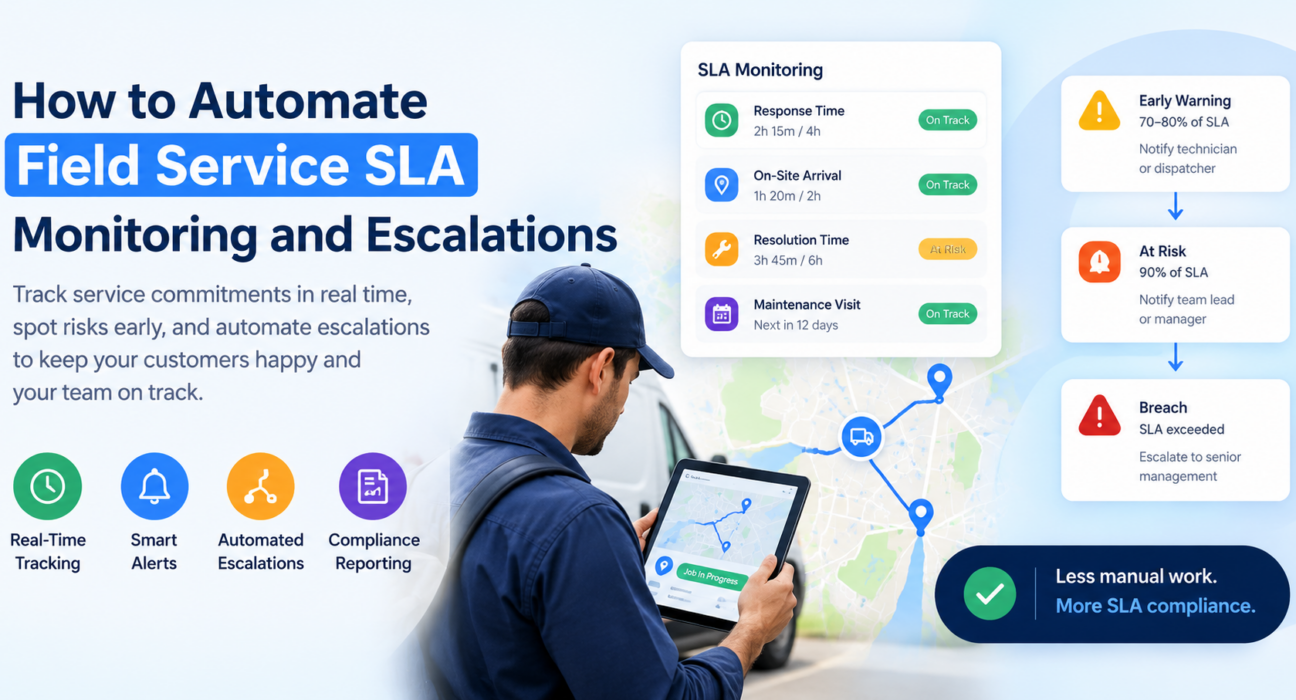
Rather than waiting for a breach, the software should flag jobs approaching risk. A common approach is a tiered alert:
| Alert Level | Trigger | Typical Action |
|---|---|---|
| Early Warning | 70–80% of SLA time elapsed | Notify assigned technician or dispatcher |
| At Risk | 90% of SLA time elapsed | Notify team lead or manager |
| Breach | SLA time exceeded | Escalate to senior management, log breach |
Automated Escalation Workflows
When a job crosses a threshold and no one takes action, the system should automatically escalate it — reassigning the job, notifying a supervisor, or triggering a defined response — so no person has to catch the delay manually.
Centralized Reporting and Audit Trails
Automated systems log every SLA event, which supports both day-to-day management and compliance reporting when a customer contract requires proof of service levels.
Step-by-Step: Setting Up Automated SLA Monitoring and Escalations
- Define your SLA terms clearly. List response time, resolution time, and any other commitments per customer, contract, or service tier. You can’t automate vague SLAs accurately.
- Map your escalation hierarchy. Decide who gets notified at each stage — technician, team lead, operations manager — and in what order.
- Set threshold rules. Configure early-warning and at-risk alerts based on percentage of SLA time elapsed, not just the final deadline.
- Connect real-time field data. Ensure technician location, job status, and attendance data feed into the system live, rather than having someone update it manually at day’s end.
- Automate notifications. Use SMS, email, or in-app alerts so an alert reaches the right person the moment a job crosses a threshold.
- Review compliance reports regularly. Use weekly or monthly SLA reports to identify recurring bottlenecks — a specific region, technician, or job type that consistently runs late.
- Refine SLA rules over time. As you gather data, adjust thresholds and escalation paths to reflect what actually works for your team’s capacity.
Best Practices for SLA Compliance in Field Teams
- Tie SLAs to realistic capacity. An SLA that ignores travel time, technician availability, or geography will break constantly, regardless of how good your software is.
- Use geofencing to confirm arrival, not estimates. Automated arrival detection removes the guesswork of relying on technician-reported times.
- Build in buffer for high-risk jobs. Complex jobs or remote locations deserve wider thresholds so a single delay doesn’t automatically trigger a false alarm.
- Make escalation visible, not punitive. Escalations should route to the person best positioned to fix the problem quickly, not simply flag blame.
- Review breaches as a pattern, not an incident. A single missed SLA is a one-off. Repeated breaches on the same route, customer, or technician usually point to a resourcing or planning issue.
How Field Force Management Software Helps
Automating SLA monitoring depends on having accurate, real-time data about your field operations — which is exactly what field force management software provides. Rather than bolting SLA tracking onto disconnected tools, it works best as part of a system that already manages scheduling, attendance, and job status.
Businesses looking to simplify these processes can use field force management software such as FieldExecutives, which brings together real-time GPS tracking, task and visit management, and reporting in a single platform. This gives operations teams a live view of every job’s SLA status, alongside the field data — technician location, visit verification, task progress — that makes those timers accurate in the first place.
For teams managing field sales, service visits, or collections alongside SLA-bound support tickets, having attendance, route planning, and task management on the same platform also removes the need to reconcile data across multiple disconnected systems. [Internal Link Opportunity: FieldExecutives Field Force Management overview page]
SLA Monitoring vs. Traditional Helpdesk Ticketing
It’s worth distinguishing SLA monitoring in field service from generic helpdesk SLA tools, since people often mix the two up.
| Aspect | Helpdesk SLA Tools | Field Service SLA Monitoring |
|---|---|---|
| Primary data source | Ticket timestamps | GPS location, job status, technician activity |
| Location awareness | Not typically included | Central to accuracy (geofencing, live tracking) |
| Escalation trigger | Time-based only | Time-based plus location/status-based |
| Field visibility | Limited | Core requirement |
A helpdesk tool can track how long a ticket has been open. It generally can’t tell you whether a technician is stuck in traffic, has arrived on-site, or a prior job pushed their schedule back — details that directly affect whether the team meets the SLA. [Internal Link Opportunity: FieldExecutives GPS Tracking feature page]
Frequently Asked Questions
What is SLA monitoring software?
SLA monitoring software tracks service level agreement commitments — such as response and resolution times — in real time. It alerts teams when a job risks missing its deadline and automates escalations when that happens.
How does automated SLA escalation work?
Automated SLA escalation works by setting time-based thresholds within a job’s SLA window. When a job crosses a threshold and no one completes the required action, the system automatically notifies the next person in the escalation hierarchy, such as a supervisor or manager.
Why do field service teams struggle with SLA compliance?
Field service teams often struggle with SLA compliance because they lack real-time visibility into technician location and job status. That gap means delays go unnoticed until a customer complains or a contract review reveals the breach.
What data do you need to monitor field service SLAs accurately?
Accurate SLA monitoring requires live job status updates, technician location data, and clearly defined SLA terms per customer or contract. Without live field data, SLA timers rely on assumptions rather than actual progress.
Can small field service teams benefit from SLA monitoring software?
Yes. Even small teams risk SLA breaches when job loads pile up unevenly or a single technician runs late. Automated monitoring scales with the team and catches problems before a customer complaint does.
How is SLA monitoring different from general field service management?
SLA monitoring is one component of field service management that focuses specifically on tracking commitments and deadlines. Broader field service management software, like FieldExecutives, includes SLA monitoring alongside scheduling, attendance, task management, and reporting. [Internal Link Opportunity: FieldExecutives Field Service Management solutions page]
What happens when a team breaches an SLA?
When a team breaches an SLA, most systems log the event for reporting and compliance purposes. Many also automatically escalate the job to a manager or trigger a recovery process, such as reassigning it to another available technician.
Does geofencing help with SLA monitoring?
Yes. Geofencing verifies a technician’s actual arrival at a job site, which makes SLA timers for visit and resolution time far more accurate than relying on arrival times technicians report manually.
Conclusion
A single bad day rarely causes SLA breaches — they’re usually the result of visibility gaps that build up unnoticed until a customer feels the impact. Automating SLA monitoring closes that gap by tracking every commitment in real time, alerting the right people before they miss a deadline, and escalating automatically when they do.
For field service teams, this depends on having accurate, live data about where technicians are and how jobs are progressing — not just a countdown clock disconnected from actual field activity. SLA monitoring software built directly into a broader field force management platform, like FieldExecutives, gives teams that visibility without adding another disconnected tool to manage.
If missed SLAs are costing you customer trust or contract penalties, it’s worth seeing how automated tracking and escalation could fit into your current workflow.