
Most enterprise HR departments still operate with significant manual work. Onboarding new employees involves copying data between systems, sending standardized emails, creating accounts, ordering equipment, and scheduling orientation. Performance reviews require chasing managers for overdue submissions, manually compiling ratings, and routing approvals through email. Time-off requests sit in managers’ inboxes waiting for approval while employees wonder about their status.
These manual processes consume enormous amounts of HR staff time without adding meaningful value. An HR operations specialist might spend three hours onboarding one employee when 80 percent of that work follows predictable steps that could be automated. Multiply that across hundreds of new hires per month, and you’re talking about multiple full-time positions dedicated to administrative work.
The business case for workflow automation in HRIS systems is straightforward. Eliminate manual tasks that don’t require human judgment, accelerate processes that currently wait for human intervention, reduce errors that come from manual data entry, and free HR staff to focus on work that actually requires expertise. The challenge isn’t understanding the value. It’s implementing automation properly so it delivers reliable results rather than creating new problems.
At enterprise scale, workflow automation requires careful design, thorough testing, proper integration with other systems, and ongoing maintenance as processes evolve. Organizations that automate thoughtlessly create rigid workflows that don’t handle exceptions, generate errors that require manual cleanup, or simply stop working when related systems change. The automation becomes a liability instead of an asset.
Where Automation Delivers Real Value
Not every HR process benefits equally from automation. The highest-value targets are repetitive, high-volume workflows that follow consistent patterns and don’t require complex judgment.
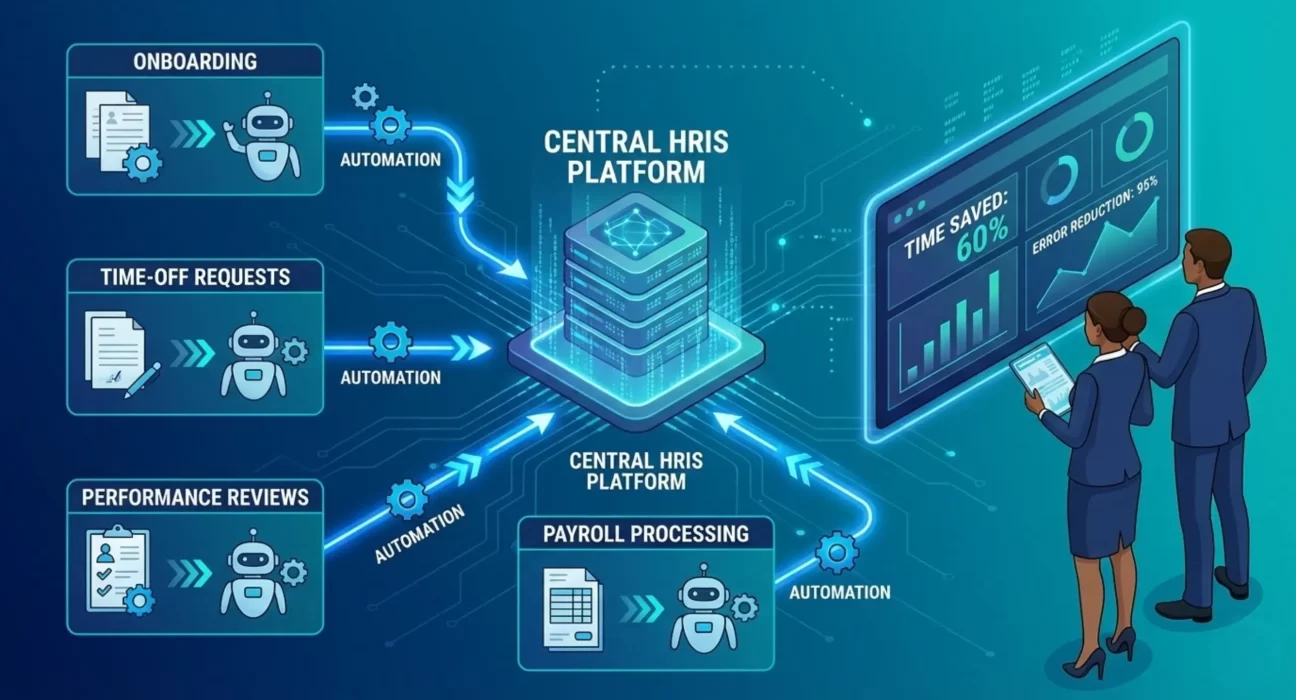
Employee onboarding is the classic automation opportunity. When someone accepts an offer, a sequence of predictable actions needs to happen. Create user accounts in various systems, assign appropriate access permissions, order equipment, enroll in benefits, schedule orientation, assign training modules, notify the hiring manager and team. Each step depends on the previous one completing successfully.
Manual onboarding means HR staff execute these steps individually, often across multiple systems, while tracking progress in spreadsheets or email. Automated onboarding triggers the entire sequence when the offer is accepted. The HRIS creates tasks for different teams, monitors completion, sends notifications, and escalates delays. HR staff only engage when exceptions occur or approvals are needed.
Time-off management automation eliminates the email and spreadsheet approach many organizations still use. Employees submit requests through self-service, the system checks policy limits and blackout dates, routes to managers for approval, updates calendars automatically, and maintains accurate accrual balances. Managers see their team’s time-off schedule and can approve or deny requests without email. Payroll receives accurate data automatically.
Performance review cycles involve coordinating dozens or hundreds of managers to complete reviews on schedule, ensuring proper calibration, routing approvals through appropriate chains, and capturing the results for compensation planning. Automated workflows send reminders, track completion, escalate overdue items, enable calibration sessions, and feed results into downstream processes. What used to require constant manual follow-up happens automatically with visibility into progress.
Compensation changes require approval workflows that vary based on amount, reason, and organizational level. Small merit increases might need only direct manager approval. Larger increases require multiple approvals up the management chain, plus HR review. Promotions might require different approval paths than retention adjustments. Automated workflows route each request appropriately based on defined rules, maintain audit trails, and prevent unauthorized changes.
Organizational changes like transfers, promotions, and terminations trigger cascading actions across multiple systems. Access needs to change, compensation might adjust, reporting relationships update, physical location changes, and equipment gets reassigned. Automated workflows ensure all necessary actions happen in the right sequence without manual coordination across multiple teams.
The Integration Requirements Nobody Mentions
Workflow automation in your HRIS doesn’t exist in isolation. Real value comes from automating end-to-end processes that span multiple systems, which means integration work that many organizations underestimate.
Onboarding automation needs to connect with identity management systems to create accounts, email platforms to provision mailboxes, device management to prepare equipment, access management to grant appropriate permissions, learning platforms to assign training, and payroll systems to establish payment information. Each integration point is a potential failure mode that needs error handling and monitoring.
Time-off automation requires integration with payroll so time-off is reflected in paychecks correctly. It needs calendar integration so time-off appears on shared calendars. It might need integration with scheduling systems for operations with shift coverage requirements. The workflow spans multiple systems, and all of them need to stay synchronized.
Performance review automation connects to compensation planning systems because review outcomes drive merit increases and bonuses. It connects to talent management systems that track development plans and succession planning. It might connect to learning management systems to assign development activities based on review feedback.
These integrations add complexity and cost to automation initiatives. An automated workflow that stays entirely within the HRIS is simpler to implement than one that orchestrates actions across five different systems. But the end-to-end automation is what delivers real business value, so the integration work is necessary.
Organizations often discover integration requirements late in automation projects when it becomes clear that workflow automation in the HRIS alone doesn’t eliminate manual work. The manual work just shifts from within the HRIS to managing data between the HRIS and other systems. Proper automation planning identifies integration needs upfront and accounts for them in timelines and budgets.
Handling Exceptions Without Breaking Automation
Automated workflows work brilliantly for standard cases and fail miserably when exceptions occur if not designed properly. The key is building workflows that handle common exceptions gracefully while escalating unusual situations to humans.
Exception routing sends non-standard cases to appropriate reviewers instead of forcing them through standard paths. An onboarding workflow for a contractor follows different steps from one for a regular employee. A termination for cause requires different approvals than a voluntary resignation. The automation needs to recognize these variations and route accordingly.
Manual intervention points allow humans to step in when automated processes encounter problems. If account creation fails during onboarding, the workflow should pause, notify the appropriate team, and resume once the issue is resolved. The workflow shouldn’t just fail silently or continue without critical steps being completed.
Escalation procedures ensure that delayed or stuck workflows get attention. If a manager hasn’t approved a time-off request in 48 hours, escalate to their manager. If onboarding tasks remain incomplete three days before the start date, alert HR operations. These escalations prevent automation from becoming invisible until someone notices work isn’t getting done.
Override capabilities let authorized users intervene when business needs require deviating from standard workflows. Rush an approval that’s stuck in someone’s queue who’s unexpectedly out. Process an onboarding outside the normal sequence because of an urgent business need. These overrides should be logged and limited to specific roles, but they need to exist.
The goal is automation that handles 85 to 90 percent of cases completely without human intervention while gracefully managing the remaining 10 to 15 percent that need special handling. Workflows that try to automate everything break when they encounter situations the designers didn’t anticipate. Workflows with proper exception handling remain reliable and useful even when unusual circumstances arise.
The Configuration Versus Customization Tradeoff
Modern HRIS platforms offer extensive workflow configuration capabilities, but configuration has limits. Organizations face decisions about when to work within configuration constraints versus investing in custom development.
Configuration uses the platform’s built-in workflow engine to define processes, rules, approvals, notifications, and integrations. This approach is faster, costs less, and remains supportable through platform upgrades. The limitation is that you’re constrained by what the platform’s configuration model supports.
Customization involves writing code to extend the platform beyond configuration capabilities. This provides flexibility to implement exactly what you want, but creates technical debt. Custom code needs maintenance when the platform upgrades, requires specialized developer skills, and can break when platform APIs change.
The right approach for most enterprises is maximizing configuration while minimizing customization. Use the platform’s workflow capabilities for 80 to 90 percent of automation needs. Reserve customization for truly unique requirements that deliver substantial business value and can’t be reasonably approximated through configuration.
This requires adapting some business processes to work within platform constraints rather than customizing the platform to match every current process exactly. That adaptation is often beneficial because current processes might include inefficiencies or complexity that don’t need to be preserved. Implementing new technology provides an opportunity for process improvement, not just automating problematic old processes.
Organizations that heavily customize their HRIS create maintenance burdens and upgrade challenges. Every platform upgrade requires regression testing of all customizations and potentially modifying custom code. Organizations that stay mostly within configuration upgrade more easily and spend less on ongoing maintenance.
Measuring Automation Value
The business case for workflow automation needs to translate into measurable outcomes that you track after implementation.
Time savings should be quantified in terms of hours reclaimed from specific roles. If onboarding automation reduces HR operations specialists’ time per new hire from three hours to 30 minutes, and you hire 200 people per month, that’s 500 hours per month freed up for other work. That translates to roughly three full-time positions’ worth of capacity.
Error reduction provides both cost savings and risk mitigation. Manual data entry creates mistakes that cause downstream problems. Missed steps in onboarding leave new employees without the required access. Errors in compensation changes create payroll corrections and employee frustration. Automation that eliminates these errors has tangible value even if it’s harder to quantify precisely.
Process acceleration shows up in metrics like time from offer acceptance to productive first day, time from time-off request to approval, or time to complete performance review cycles. Faster processes improve employee experience and organizational agility. The value compounds across hundreds or thousands of instances per year.
Compliance improvement comes from consistent process execution and complete audit trails. Automated workflows ensure required approvals happen, necessary documentation is captured, and policy rules are enforced. This reduces compliance risk and simplifies audits.
Capacity reallocation matters as much as headcount reduction. Most organizations don’t reduce HR staff after automation. They redirect staff time from administrative work to strategic initiatives like talent development, workforce planning, or employee relations. The value comes from doing more valuable work with existing resources, not just from cost reduction.
These metrics should be established before implementation and tracked afterward to validate that automation delivers expected value. Organizations that don’t measure results can’t demonstrate ROI or make informed decisions about where to invest in additional automation.
How Ozrit Implements HRIS Workflow Automation
Ozrit’s approach to workflow automation starts with process analysis to understand current workflows, identify automation opportunities, and define a realistic scope. Not every process should be automated, and trying to automate everything in one program creates unrealistic timelines and quality problems.
The analysis typically identifies five to ten high-value workflows that will be included in the initial automation program. Additional workflows can be addressed in subsequent phases once initial automation is stabilized and delivering value.
Design work defines how automated workflows will function, what integration is required, how exceptions will be handled, what approvals are needed, and what monitoring will ensure reliability. This design includes detailed process maps, integration specifications, and testing scenarios.
A senior program manager owns the automation implementation from design through deployment and stabilization. They coordinate across HR, IT, and vendor teams, manage dependencies, make decisions when tradeoffs arise, and ensure delivery stays on track. You work with one accountable leader rather than coordinating multiple workstreams independently.
The implementation team typically includes six to ten people, depending on the scope. Workflow configuration specialists, integration developers, testing professionals, change management consultants, and training specialists. The team composition reflects the reality that successful automation requires both technical implementation and organizational adoption.
Realistic timelines for comprehensive workflow automation programs run four to six months from kickoff to production deployment. Organizations with particularly complex requirements, extensive integration needs, or significant process redesign might require longer. The timeline accounts for design, configuration, integration, development, testing, training, and phased rollout.
Ozrit provides ongoing support after automation goes live because workflows need adjustment as business processes evolve and edge cases are discovered. This support includes 24/7 monitoring of critical workflows, rapid issue resolution when problems occur, and regular optimization reviews to improve automation effectiveness.
The goal is to create sustainable automation that continues delivering value long-term, not just completing an implementation project. This requires proper design, solid technical implementation, thorough testing, effective change management, and ongoing operational support.
Making Automation Last
Workflow automation doesn’t maintain itself. Processes change, systems get upgraded, business requirements evolve, and automation needs corresponding updates to remain effective.
This requires governance that includes regular review of automated workflows to ensure they still reflect current business needs and compliance requirements. Quarterly reviews identify workflows that need adjustment, processes that have changed without automation updates, and new automation opportunities as business needs evolve.
Ownership clarity for each automated workflow ensures someone is responsible for maintaining it. That person reviews performance metrics, investigates issues, coordinates changes, and ensures documentation remains current. Without clear ownership, automated workflows slowly degrade as small problems accumulate and nobody addresses them.
Change management processes ensure that business process changes include corresponding automation updates. When compensation policies change, approval workflows need updating. When organizational structure changes, routing rules need adjustment. These automation impacts should be considered during process change planning, not discovered after the fact when workflows break.
Continuous improvement based on usage data and user feedback makes automation more valuable over time. Add capabilities that users request frequently. Streamline steps that confuse. Improve error messages that don’t clearly indicate problems. Expand integration to eliminate manual touchpoints that remain.
Your HRIS workflow automation represents a significant investment in operational efficiency. Organizations that treat it as a one-time project see value degrade over time as the automation slowly stops matching business reality. Organizations that maintain and improve automation sustain value and continue finding new opportunities to eliminate manual work and accelerate processes.
The Real Cost of Manual Processes
The alternative to workflow automation isn’t zero cost. It’s the ongoing expense of manual processes that consume staff time, introduce errors, delay decisions, and prevent HR from focusing on strategic work.
Calculate what your current manual processes actually cost. How many people spend how much time on repetitive administrative tasks? What’s the error rate, and what does error correction cost? How much longer do processes take manually versus what automation could deliver? What strategic initiatives aren’t happening because staff capacity is consumed by administrative work?
The business case for automation becomes compelling when you honestly assess current costs. The implementation investment might seem large, but it typically pays back within 12 to 18 months through time savings, error reduction, and capacity reallocation. The ongoing value continues for years as long as the automation is properly maintained.
More fundamentally, manual processes don’t scale with business growth. Hiring 200 people per month with manual onboarding requires proportionally more HR staff than hiring 400 people per month with automated onboarding. Automation creates scalable operations that support growth without linear headcount increases. That scalability becomes strategically important as your organization expands.